
💡 How to Streamline Faculty Meetings with AI-Generated Summaries via ChatGPT
3 min read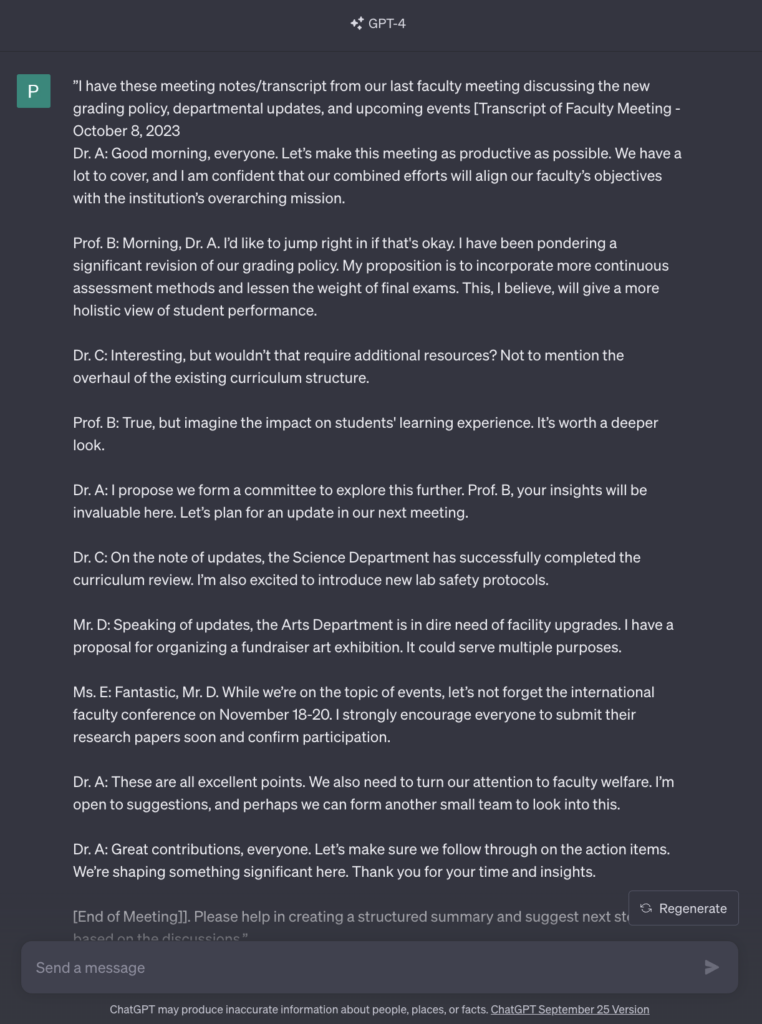
Faculty meetings are essential for collaborative decision-making and staying updated on institutional developments. However, they can be lengthy and sometimes inefficient.
<!-- /wp:paragraph -->Integrating AI in the summarization of faculty meetings can be a game-changer, ensuring that key points are captured and made accessible promptly.
<!-- /wp:paragraph -->In this piece, we'll delve into how ChatGPT can be employed to create concise summaries of faculty meetings from transcribed text or meeting notes. 📝
<!-- /wp:paragraph -->🚩 Key Advantages of AI-Driven Summaries
<!-- /wp:heading -->- Time-Saver - ChatGPT can swiftly generate summaries, freeing up time for other tasks
- <!-- /wp:list-item --> Accurate Record-keeping - Maintain a clear, concise record of discussions and decisions
- <!-- /wp:list-item --> Ease of Access - Quick reference to past meetings enhances follow-up and accountability <!-- /wp:list-item -->
✅ Step-by-Step Guide
<!-- /wp:heading -->Follow these steps to leverage ChatGPT for summarizing faculty meetings:
<!-- /wp:paragraph -->1. Obtain a Transcription or Use Meeting Notes
<!-- /wp:paragraph -->If a transcription service (Otter.ai, Fireflies.ai, Google Meet, or Zoom) is used for the meeting, great! If no transcriptions are available, simply use the meeting notes you have on hand.
<!-- /wp:paragraph -->2. Review the Transcription or Meeting Notes
<!-- /wp:paragraph -->-
Check for accuracy and clarity
-
<!-- /wp:list-item -->
Confirm the inclusion of key decisions and discussion points
-
<!-- /wp:list-item -->
For data privacy, create a legend of the names involved. Replace with placeholders. *For example:*Legend:
- Dr. A: Chair of the Meeting/Head of the Faculty
- <!-- /wp:list-item --> Prof. B: Senior Faculty Member Proposing New Grading Policy
- <!-- /wp:list-item --> Dr. C: Head of the Science Department
- <!-- /wp:list-item --> Mr. D: Head of the Arts Department
- <!-- /wp:list-item --> Ms. E: Coordinator of Upcoming Events <!-- /wp:list-item -->
3. Generate Initial Summary
<!-- /wp:paragraph -->Try this prompt:
<!-- /wp:paragraph -->“Based on the transcribed text or meeting notes, please provide a summarized version highlighting the key decisions, updates, and upcoming events discussed during the meeting.”
<!-- /wp:paragraph -->Here’s another way of doing it—
<!-- /wp:paragraph -->Sample prompt: ”I have these meeting notes from our last faculty meeting discussing the new grading policy, departmental updates, and upcoming events
Shortcode
[insert notes here]
. Please help in creating a structured summary and suggest next steps based on the discussions.”
<!-- /wp:paragraph -->
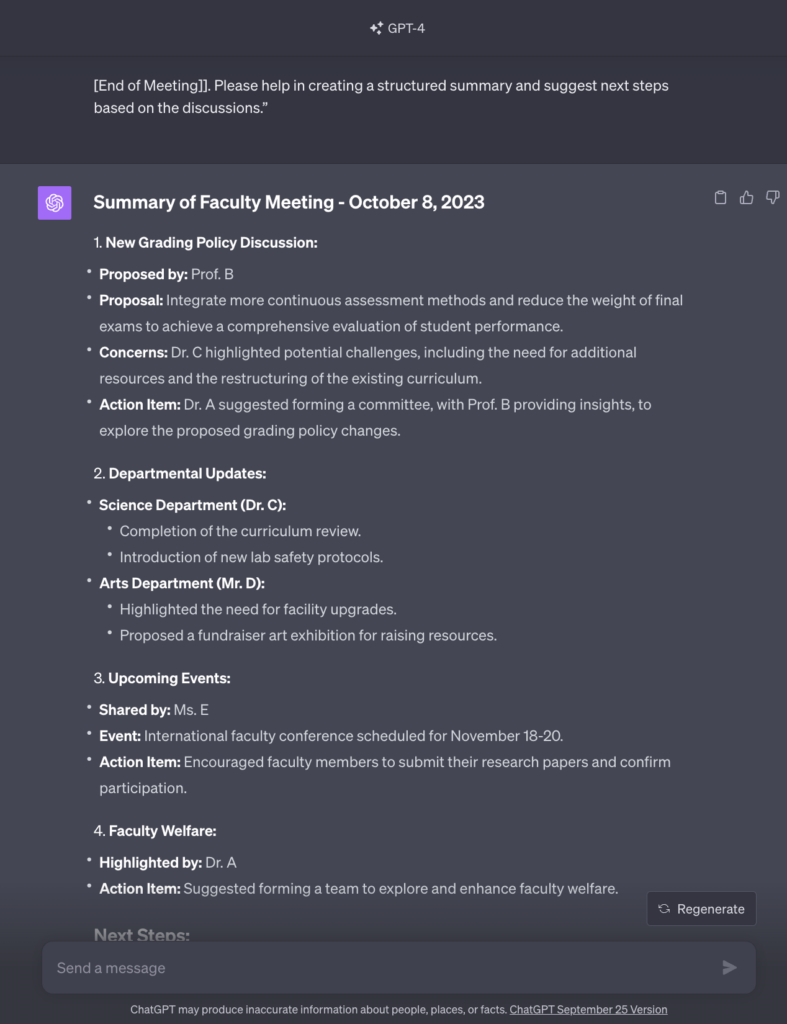
View the full conversation here (← click!)
<!-- /wp:paragraph -->4. Refine the Summary
<!-- /wp:paragraph -->-
Ensure all crucial points are covered
-
<!-- /wp:list-item -->
Adjust the tone to match the institution's communication style
-
<!-- /wp:list-item -->
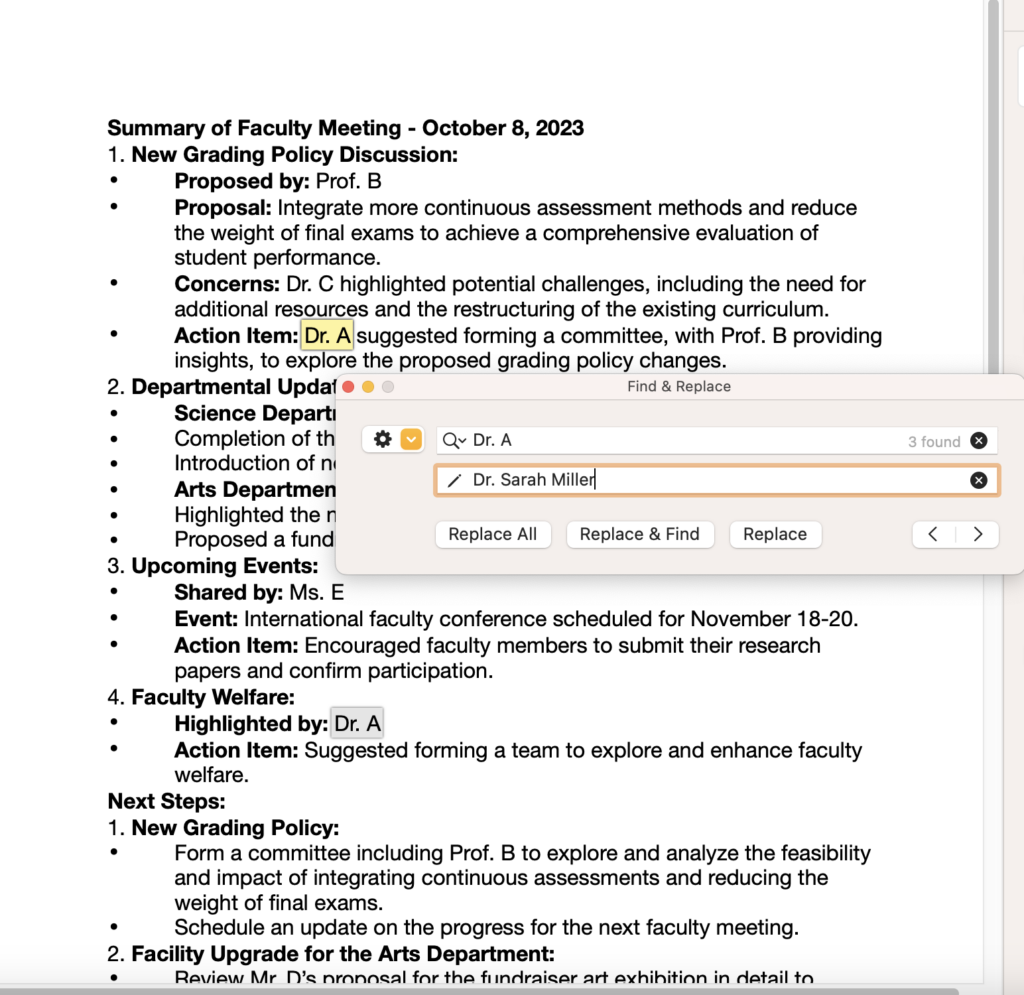
For data privacy measures, replace all the name placeholders on Word, Docs, or Pages:
-
Copy-paste the summary on a new document
-
<!-- /wp:list-item -->
Add the legend with names to avoid confusion. For example:
- Dr. A: Dr. Sarah Miller (Chair) - Chair of the Meeting/Head of the Faculty
- <!-- /wp:list-item --> Prof. B: Prof. John Adams - Senior Faculty Member Proposing New Grading Policy
- <!-- /wp:list-item --> Dr. C: Dr. Emily Thompson - Head of the Science Department
- <!-- /wp:list-item --> Mr. D: Mr. Mark Robinson - Head of the Arts Department
- <!-- /wp:list-item --> Ms. E: Ms. Linda Green - Coordinator of Upcoming Events <!-- /wp:list-item -->
-
<!-- /wp:list-item -->
Use the Find & Replace function. Replace all the placeholders
<!-- /wp:list-item -->
-
💡 Tips for Effective Summarization
<!-- /wp:heading -->- Provide Clear Instructions - Specify the level of detail and format you desire
- <!-- /wp:list-item --> Verify Information - Cross-check the summary for accuracy and completeness
- <!-- /wp:list-item --> Utilize Keywords - Help ChatGPT identify key topics by providing a list of relevant terms <!-- /wp:list-item -->
🏁 Reaching the Finish Line Faster
<!-- /wp:heading -->With the help of AI, creating a structured summary and suggesting possible next steps can be done faster. This provides a clear path for action and ensures collaborative efforts towards achieving the set goals.
<!-- /wp:paragraph -->